Annexures on letterhead
Bidder details, declarations, undertakings and formats are filled with your company information on your own letterhead, not a generic template.
Fill your documents once. For every tender, BidShakti prepares the annexures on your letterhead, orders them the way the portal wants them, and flags anything that is missing.
A bid pack is only as good as the documents behind it.
Your vault holds the certificates every tender asks for again and again: turnover certificate, audited financials, ITR, GST and PAN, MSME or startup registration, licences, work orders, completion certificates and product certificates.
Each document carries an expiry date where one applies. BidShakti alerts you before a licence or certificate lapses, so you are not discovering on the last day that a registration has expired. The same vault feeds the Go/No-Go verdict, so the facts you maintain once serve both the decision and the submission.
Bidder details, declarations, undertakings and formats are filled with your company information on your own letterhead, not a generic template.
Files are numbered and arranged to follow the portal checklist, so uploading is a matter of working down the list.
The set is prepared with signatures in place and delivered together as a single zip you can download in one click.
Anything missing is listed as a flag. The pack never invents a value or substitutes a document to look complete.
Price never enters the technical envelope. Technical and financial material stay apart, which avoids a disqualification that is easy to prevent.
File names follow GeM upload conventions, so documents go in cleanly without renaming or merging by hand.
Three helpers sit in front of the zip.
A scan lists every document the tender needs and where each one stands: in the vault, to upload, to generate, or to get from your CA.
Ten to fifteen declarations per bid are filled for you, such as no-blacklisting, Make in India, MSE or Udyam, land-border, NDA, IPR and GFR declarations.
Price break-up, technical approach, escalation matrix and project plan are drafted for you to review and edit.
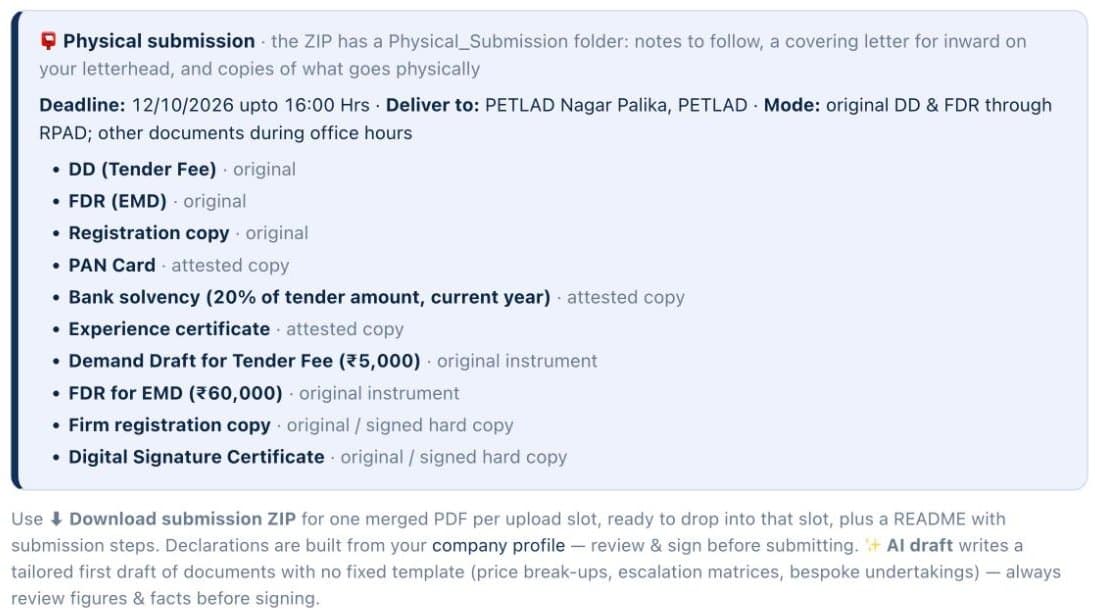
Two views from the Documents tab of a live workspace on a public municipal tender. The checklist shows what the pack can assemble now and what is pending on you. The physical submission box lists what goes by hand, with the deadline and the office.
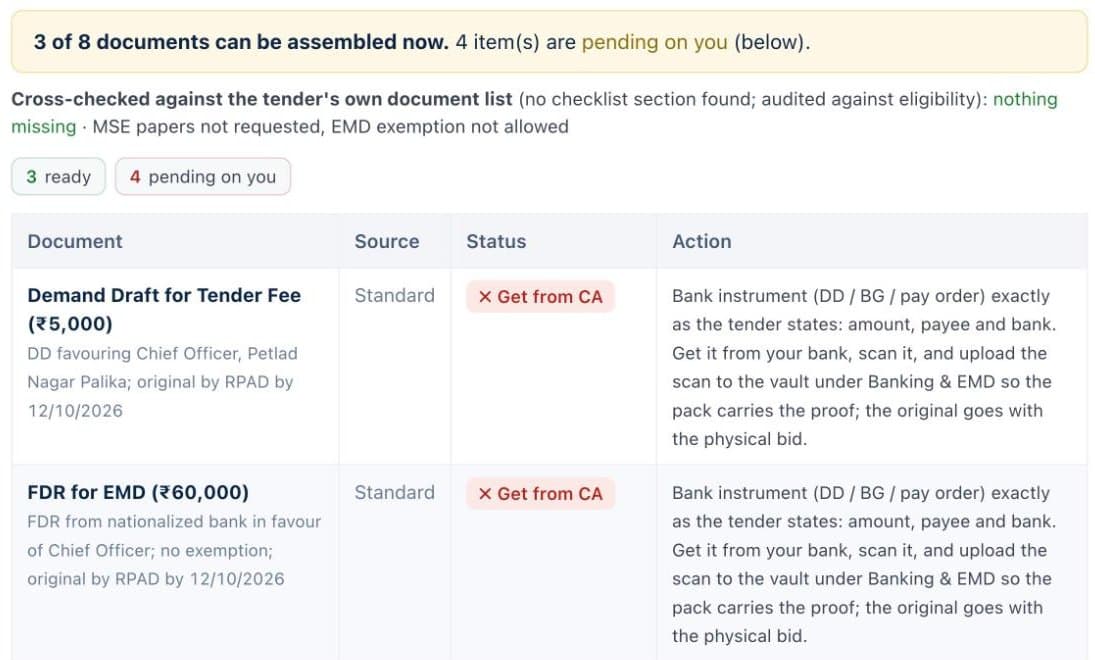
Documents carry your letterhead with the digital signature and stamp on every page. Office files are converted to PDF. You can download named PDFs, one for each GeM upload slot, or one merged PDF with bookmarks.
Submitted bids are tracked in the workspace. A master account and team-member roles let the owner see every bid while a team member works only on the tenders assigned to them.
Many tenders still need hard copies alongside the online upload.
For those tenders the pack includes a checklist for the physical folder: which documents to print, which need signature and company seal, which need stamp paper or notarisation, what goes in each envelope, and the order in which the buyer will open them. A lost page or an unsealed annexure is a common reason for rejection, and a checklist is a cheap fix.
The pack helps you prepare. It does not submit for you. You upload with your own DSC, or you can take BidShakti Assist if you want our team to handle submission with you. Either way, a clean set prepared in advance leaves you time to review the technical response, which is where most tenders are actually decided.
Because the pack is generated from the same vault and the same tender analysis, it also reflects what that tender asks for, not a fixed bundle. Combine it with the Go/No-Go verdict and the price band, and you have a decision and a submission from the same set of facts.
Read more about the Go/No-Go verdict and winners and competitors, check pricing, or start the 7-day free trial.
The annexures and declarations filled on your company letterhead, the supporting documents from your vault, and the signed set, arranged in the order the portal asks for uploads and delivered as one zip. The bid pack is part of the Win plan.
No. If a required document or value is not in your vault, the pack flags it and tells you what is missing. It does not fill in assumed values or use an unrelated certificate.
Never. Price information stays out of the technical pack in every case. Financial quotes belong in the financial envelope and the pack is built to keep the two separate.
Yes. For tenders that need physical copies, you get a physical folder checklist covering what to print, sign, stamp and seal, in the order the buyer expects to open them.
Start the 7-day free trial, set up your company profile once, and get tomorrow’s matches with a decision attached.