Meets
The vault holds a fact that satisfies the clause, and the row cites the document and page it came from.
The Go/No-Go engine reads the whole tender, checks every eligibility clause against the documents in your vault, and shows the source of each answer. No guesses and no black box.
Many tools show a score without showing why. BidShakti uses a single verdict engine for the whole product, and it works from facts you can inspect.
Facts come from your vault documents: the turnover certificate, audited financials, ITR, work orders and completion certificates, licences and product certificates. When a tender says the bidder must have an average turnover of a stated amount, the engine does not ask you to type a number. It reads your documents.
Turnover is computed across the last three financial years and the highest single year is noted as well. The engine then compares in the way the tender words the condition, because average of three years, any one year and each of three years are different tests and give different answers for the same company.
Similar work is compared from completed values. A work order alone does not prove a job was finished, so the engine looks at completion certificates and the value actually completed, then checks that against the share of the estimated cost the tender asks for. Declarations and blacklisting conditions are checked too, so a missing undertaking shows up before submission day.
The vault holds a fact that satisfies the clause, and the row cites the document and page it came from.
The vault holds a fact that fails the clause. You see the clause, your value and the source, so you know exactly why.
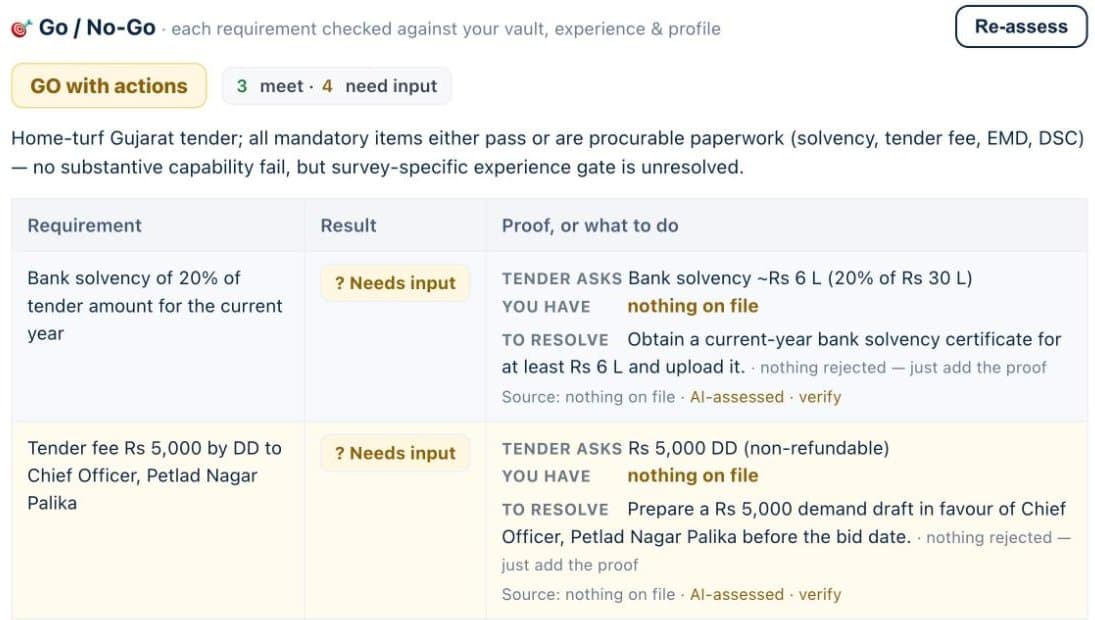
The vault cannot answer the clause yet. The row asks for the missing document or value and never forces a No-Go.
The third state matters most. Most real tenders have a few conditions your vault does not answer yet. Treating those as failures would send you away from tenders you could win. Treating them as passes would be dishonest. So they are marked Needs input, the overall verdict stays open, and you decide whether the missing item is easy to get.
Each row carries its provenance: the document the fact came from and the page. Click through and you are looking at your own certificate, not our opinion of it.
Documents get renewed, financials get audited and new work orders arrive. Verdicts follow.
Upload a new certificate and BidShakti reassesses the affected tenders automatically. You do not press a refresh button. A tender that needed a licence you have just uploaded moves from Needs input to Meets.
The badge you see in the tender list and the verdict on the tender detail page come from the same engine and the same facts, so they always agree. If you see Go in the list, you will not open the tender and find a different answer.
Two views from a live workspace on a public municipal tender. The summary card sits on the tender overview, and the requirement table behind it shows each row with what the tender asks, what is on file and what to do next.
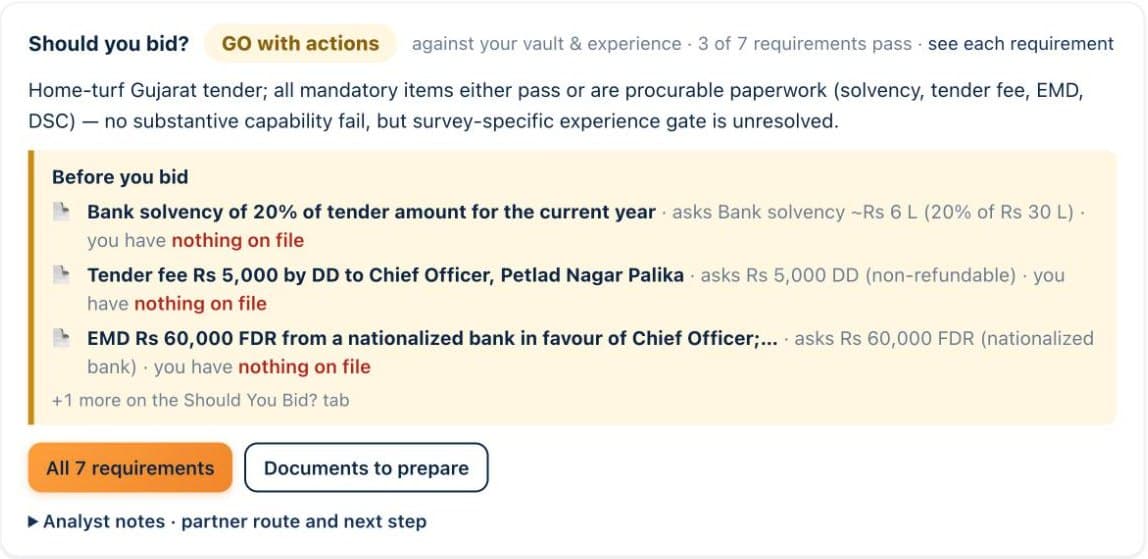
The overall verdict is a recommendation, and your team has the last word.
The verdict options include Bid, Bid-as-partner and No-bid. Bid-as-partner is useful when you meet most conditions but need a joint venture or a consortium member to cover the rest. Your team can override the verdict, so a senior person can choose to bid even when a clause is open, with the reasoning on record.
Where a tender uses QCBS, the engine reads the weightage the buyer states, most commonly a 70:30 or a 60:40 split between technical and financial scores, and uses it in the marks estimate. The free QCBS calculator lets you test the same splits by hand.
| Topic | Other portals | BidShakti |
|---|---|---|
| What you see | A list of tenders with title, date and value | A verdict per tender with a line for every eligibility clause |
| Eligibility | You read the PDF and decide | Each clause checked against your vault documents |
| Turnover | You calculate it yourself | Last three years and highest single year, compared as the tender words it |
| Similar work | You search your old files | Matched from completed values in your work orders and certificates |
| Proof | None | Document and page cited on each row |
| Missing documents | You find out at evaluation | Shown as Needs input before you spend time |
A good verdict is only the first decision. Next, see who you are likely to compete with on winners and competitors, then turn a Go into a submission with the bid pack. You can try all of it free for seven days, see pricing or start the trial.
It means the tender asks for something that your vault does not yet answer, for example a certificate that has not been uploaded. It is never treated as a failure. The overall verdict does not become No-Go because of it. Add the document or value and the row is re-checked.
The documents in your vault: turnover certificates, audited financials, ITR, work orders and completion certificates, licences and registrations, and product or quality certificates. Facts are read from these documents, not typed in as free claims.
The engine computes turnover for the last three financial years and also notes the highest single year. It then compares in the way the tender words the condition, whether that is average annual turnover, turnover in any one year, or turnover in each of the last three years.
Verdicts are reassessed automatically when the vault changes. A tender that showed Needs input can move to Meets without you doing anything else, and the listing badge and the detail page always show the same verdict.
Start the 7-day free trial, set up your company profile once, and get tomorrow’s matches with a decision attached.