Past awards
Awards by department and sector: who won, the awarded value and when. Awards only, never guesses.
Before you quote, look at what the same department has awarded before. BidShakti turns recorded awards into a competitor list, a win-chance estimate and an L1 and floor price band.
Awards by department and sector: who won, the awarded value and when. Awards only, never guesses.
Bidders who have won work from this department in this sector, with their record so you can see how often they appear.
An estimate for your company on this tender, shown together with how much award history sits behind it.
A range from comparable awards in the same sector, so you can see where winning quotes have landed.
Two views from the Winners and Competitors tab of a live workspace. The win-chance panel explains its own number, and the past-winner list shows comparable awards with price and bidder count. Firm names in the list are replaced with neutral names.
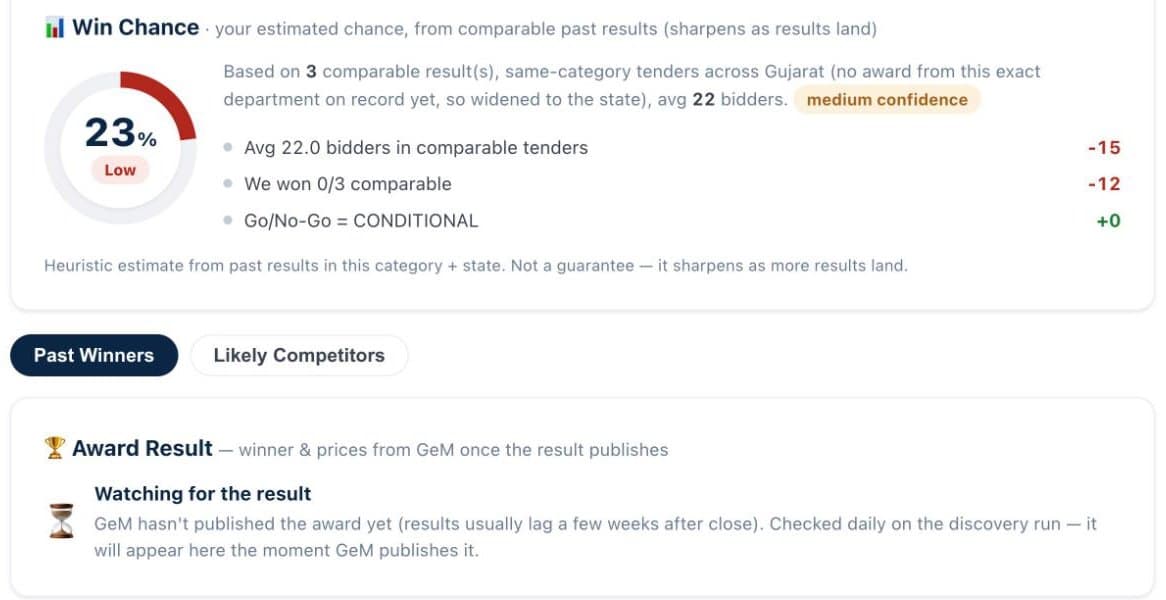
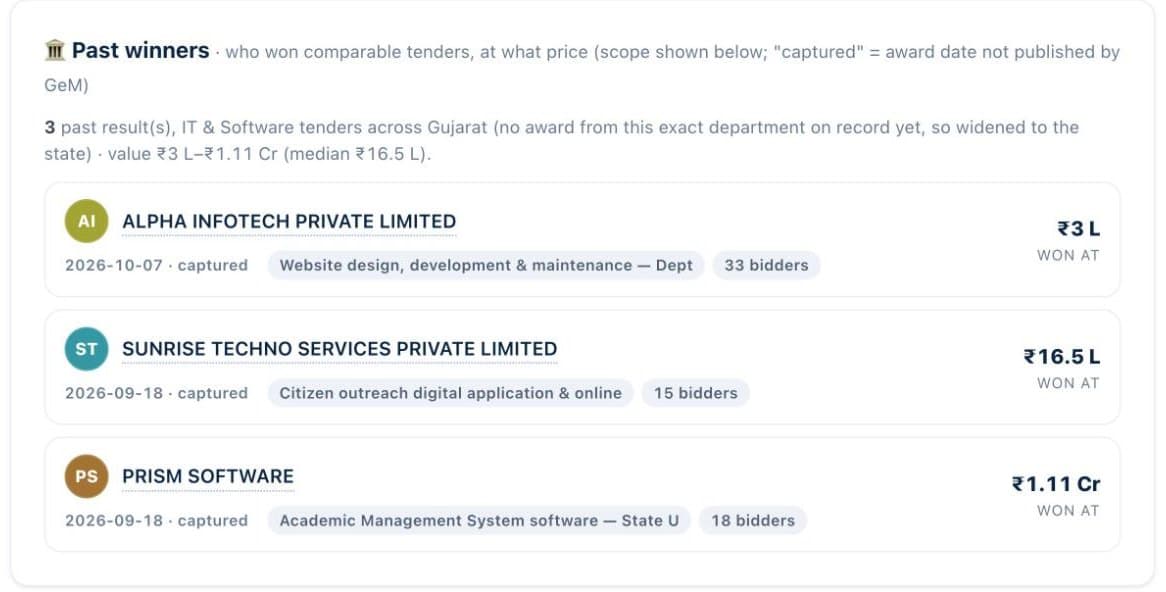
Every figure on this tab comes from a recorded award.
Competitor research is easy to fake. A tool can list companies that look similar and call them competitors. BidShakti does not. The competitors tab is built from awards that were actually recorded, grouped by department and sector. If a department has no recorded awards in your sector, the tab says so instead of inventing names.
For each likely competitor you see their record against that department: how many awards, in which sector, and at what values. This tells you whether a department keeps returning to the same two or three bidders or spreads work widely, which changes how aggressively you need to price.
The win-chance estimate is drawn from the same history and is always shown with its confidence. With only a handful of awards behind it, the confidence is low and the estimate should carry little weight. With a deep history, it is a more useful signal. In neither case is it a promise.
L1 is the lowest evaluated bid. Knowing where past L1 quotes landed is the most useful number you can have before you price.
The band is built from comparable awards only. A hard sector gate stops unrelated awards from flooding the range. A department that awards both furniture and civil work will not mix the two, so a supply tender is never measured against a building contract.
The floor shows the lowest comparable awarded value and the upper end shows the highest, with the typical L1 between them. We do not inflate the band. If there are too few comparable awards to say anything honest, the band is not shown.
Open the awards for this department and sector. Note the range of values and how many different bidders have won.
Work out your own cost and margin first. If your cost is above the top of the band, the tender is probably not for you at this scope.
Pick a quote inside the band that still earns your margin. In QCBS tenders, remember that technical score also counts, so use the free QCBS calculator to test combinations.
Award coverage grows daily as the sweep records new results, so the tab becomes more useful over time. Pair it with the Go/No-Go verdict to decide whether to bid, then build your submission with the bid pack. Try the QCBS calculator, see pricing, or start your free trial.
From recorded award and result information published on government procurement portals. We show awards only. If we do not have a recorded award, we do not fill the gap with an estimate and we do not guess who won.
It is an estimate drawn from the past awards we hold for that department and sector, and it always shows a confidence level. With few awards the confidence is low and the page says so. Treat it as one input to your decision, never as a promise.
It keeps unrelated awards out of the price band. A department may award street light supply, road work and consultancy. Only awards in the same sector as your tender feed the L1 and floor band, so a large civil award cannot distort a supply tender.
No, and it is not presented as complete. Coverage grows every day as our sweep records more results, so a department that shows few awards today may show more next month.
Start the 7-day free trial, set up your company profile once, and get tomorrow’s matches with a decision attached.